Overview
typemaid runs workflows whose shape you can see. The flow lives in a .mmd file that any Mermaid viewer can draw; each box in the diagram is a TypeScript function checked with Zod.
- The diagram is the program. Branches, loops, parallel steps and for-each blocks are written in Mermaid. The control flow is compiled to plain JSON, so no model decides which step runs next.
- Typed steps. Each step declares its input and output with Zod. Problems in the diagram or the tools are reported before anything runs, with file, line and a suggested fix.
- Pause and resume. A run can wait for a person, be saved to SQLite, Postgres or libSQL, and continue later, even in another process.
- Model calls where you want them. Agent steps and model calls inside tools use the Vercel AI SDK, so any provider it supports works.
- A viewer.
typemaid viewopens a local, read-only page that draws your workflows, lists their steps and shows problems.
flows/hello.mmd ──► tools.ts (typed steps) ──► run() ──► completed | paused | failedDocs: getting started · durability · retries · stores · models · FAQ
Status: v0, not published to npm yet. The name and the .mmd extension can still change (see Renaming).
Install
npm install typemaid zodWorks the same with bun add, pnpm add or yarn add. Zod 4.2 or newer is required. Nothing else is installed with it.
The workflow viewer is a separate, optional package, so projects that only run workflows stay small:
npm install -D @typemaid/view| Runtime | What works | Checked by |
|---|---|---|
| Node 22+ | Everything | bun run runtimes on Node 22 and 24 |
| Bun 1.2+ | Everything | the test suite |
| Browsers, edge workers (Cloudflare, Vercel Edge) | The core: compile, check, run, pause and resume. Pass the diagram as text, not a file path. No SQLite store, CLI or viewer. | a sandbox with no Node APIs |
| Deno | Expected to work like Node; not tested yet | not checked |
The package is ES modules only. require('typemaid') works on Node 22.12+ and Bun.
| Import | What it is |
|---|---|
typemaid |
run, resume, compile, check, tool, agent, human, the memory store |
typemaid/ai |
defineAI: set the model once, for agent steps and for model calls inside tools |
typemaid/sqlite |
a store that keeps runs in a SQLite file |
typemaid/node |
file helpers used by the CLI and the viewer: find diagram files and load the tools file next to them |
@typemaid/view |
the workflow viewer (separate package) |
@typemaid/postgres |
a store that keeps runs in Postgres (separate package) |
@typemaid/libsql |
a store that keeps runs in libSQL or Turso (separate package) |
flows/hello.mmd     the diagram: what runs, in what order
flows/tools.ts       the steps: typed with Zod
index.ts             one call to run()
hello.mmd is plain Mermaid. It previews in any Mermaid viewer.
flowchart TD
greet --> shout --> done([Done])tools.ts: each node name in the diagram is an export here.
import { z } from 'zod';
import { tool } from 'typemaid';

export const greet = tool({
  input: z.object({ name: z.string() }),
  output: z.object({ greeting: z.string() }),
  run: ({ name }) => ({ greeting: `Hello, ${name}` }),
});

export const shout = tool({
  input: z.object({ greeting: z.string() }),
  output: z.object({ loud: z.string() }),
  run: ({ greeting }) => ({ loud: `${greeting.toUpperCase()}!` }),
});
index.ts
import { run } from 'typemaid';
import * as tools from './flows/tools.ts';

const result = await run('./flows/hello.mmd', tools, { name: 'Ada' });
// { status: 'completed', runId: '…', output: { name: 'Ada', greeting: 'Hello, Ada', loud: 'HELLO, ADA!' } }
Run it with Bun, which reads TypeScript directly:
bun index.tsOr from the command line:
bunx typemaid run flows/hello.mmd --input '{"name":"Ada"}'Bun is the tool used to develop and test this package. The built package also runs on Node 22.18 or newer.
How data moves
Every step’s output is merged into one shared set of fields. A step receives the fields its input schema names, picked out by name. Fields that no step produces must be passed to run(); you get an error before anything runs if one is missing.
What you can draw
| In the diagram | Meaning |
|---|---|
a --> b |
run a, then b |
name[Any text] |
a step; name is the export it runs, the text is only a label |
first[$double] |
a step that runs the export double (to use one tool at two nodes) |
ok{"score >= 8"} or ok{passes} |
a decision; needs two arrows labelled yes and no |
ok -->|no, max 5| draft |
an arrow back makes a loop; every loop needs a max |
| two unlabelled arrows out of one node | run both branches at the same time; they join where they meet |
arrows labelled approved / rejected out of a step |
the step’s decision output picks one |
([Done]) |
a start or end marker; runs nothing |
no :::start anywhere |
the flow starts at the one node with no arrow into it; if every node is in a loop, at the node written first |
:::start on several nodes |
named entry points: run(flow, tools, input, { start: 'webhook' }) |
subgraph each["for email in emails"] + class each foreach |
run the block once per list item, a few at a time |
:::agent, :::human |
optional; checked against what the export really is |
Conditions can compare fields with numbers (10, -2.5), text and true/false/null using == != > >= < <=, combine with and or not, use brackets, read nested fields (user.age) and .length. Text goes in single quotes: {"status == 'ok'"}. Or name an exported function (ctx) => boolean.
Anything else Mermaid allows (other arrow styles, &, click actions, directives, other shapes) is rejected with a message, never silently ignored. Styling lines (classDef, style, linkStyle, direction, frontmatter) are allowed and have no effect.
Kinds of step
import { human, tool } from 'typemaid';

// Your code. `ctx.key` is the same if the step is retried or re-run after a crash.
export const charge = tool({
  input: z.object({ amount: z.number() }),
  output: z.object({ receipt: z.string() }),
  retries: 2,
  timeoutMs: 10_000,
  run: ({ amount }, ctx) => payments.charge(amount, { idempotencyKey: ctx.key, signal: ctx.signal }),
});

// Pauses the run until someone answers.
export const approve = human({ resume: z.object({ note: z.string().optional() }) });
Model calls
Model calls go through the Vercel AI SDK, so any provider it supports works. Install it and one provider:
npm install ai @ai-sdk/openaiChoose the model once, in your tools file:
import { openai } from '@ai-sdk/openai';
import { defineAI } from 'typemaid/ai';

export const ai = defineAI({ model: openai('gpt-5-mini') });
The provider is imported from the AI SDK’s own package (@ai-sdk/openai, @ai-sdk/anthropic, @ai-sdk/google, …). This package does not re-export them, so you install only the ones you use and control their versions.
An agent step asks the model for structured output. {text} is filled in from the shared fields.
export const summarize = ai.agent({
  instructions: 'You write short, factual summaries.',
  prompt: 'Summarize as bullet points:\n\n{text}',
  output: z.object({ bullets: z.array(z.string()) }),
});
Inside any tool, call the model with ai.ask (a checked object) or ai.text (plain text). Pass the tool’s ctx, so the call is cancelled if the step times out or the run is cancelled.
export const triage = tool({
  input: z.object({ review: z.string() }),
  output: z.object({ sentiment: z.enum(['positive', 'negative']), reply: z.string() }),
  run: async ({ review }, ctx) => {
    const { sentiment } = await ai.ask(ctx, {
      prompt: `Is this review positive or negative? "${review}"`,
      output: z.object({ sentiment: z.enum(['positive', 'negative']) }),
    });
    const reply = await ai.text(ctx, { prompt: `Reply in one sentence to this ${sentiment} review: "${review}"` });
    return { sentiment, reply };
  },
});
An agent can use AI SDK tools while it works out its answer. A limit on turns is required.
import { tool as aiTool } from 'ai';

const stock = aiTool({
  description: 'Look up how many units are in stock.',
  inputSchema: z.object({ product: z.string() }),
  execute: async ({ product }) => inventory.count(product),
});

export const check = ai.agent({
  prompt: 'How many units of {product} are in stock?',
  tools: { stock },
  maxSteps: 4,
  output: z.object({ units: z.number() }),
});
What to know:
- Answers are checked against
output. If one does not fit, the model is asked once more and told what was wrong; after that the step fails. - Without
defineAI, pass a model per agent (agent({ model, ... })) or per run (run(flow, tools, input, { model })). Inside tools,ctx.askandctx.textuse that model. - In tests, replace the model with a function:
run(flow, tools, input, { runAgent: async (request) => ({ bullets: ['a'] }) }). - The AI SDK is loaded only when a model call actually runs, so flows without model calls do not need it installed.
Results, pausing and resuming
run() returns one of three shapes:
{ status: 'completed', runId, output }
{ status: 'paused',    runId, waitingAt: [{ node, fields, options }] }
{ status: 'failed',    runId, error: { code, message, node } }
import { resume } from 'typemaid';
import { sqliteStore } from 'typemaid/sqlite';
const store = sqliteStore('./runs.db');
const paused = await run('./flows/triage.mmd', tools, { ticketId: 'T-1' }, { store });
// later, even in another process:
await resume(paused.runId, tools, { decision: 'approved', note: 'ok' }, { store });resume() also retries a failed run from the step that failed, and continues a run whose process died.
Without a store, runs are kept in memory and lost when the process exits. From the command line, pass --store runs.db to run if the flow can pause.
If the diagram text comes from someone you do not trust, call compile(text) yourself and pass the result to run(). A plain string passed to run() is read as a file when it ends in .mmd or .mermaid (or starts with file:), and as diagram text otherwise.
Checking
bunx typemaid check flowsReports problems with file, line and a suggested fix, and exits 1 on errors (--json for tools). It works in stages: all syntax problems first; once the syntax is clean, all structure problems (loops, starts, parallel blocks); then all tool and data problems.
flows/hello.mmd:2:13  error E1201  The box `shuot` needs a tool named `shuot`, and there is none in the tools you passed. Did you mean `shout`?
   2 |   greet --> shuot
     |             ^
The same checks run automatically inside run().
Seeing your workflows
npm install -D @typemaid/viewbunx typemaid view flowsOpens a page that draws your workflows. Give it one file and it opens on that diagram; give it a folder and it lists every workflow in it. The page updates when you save a file.
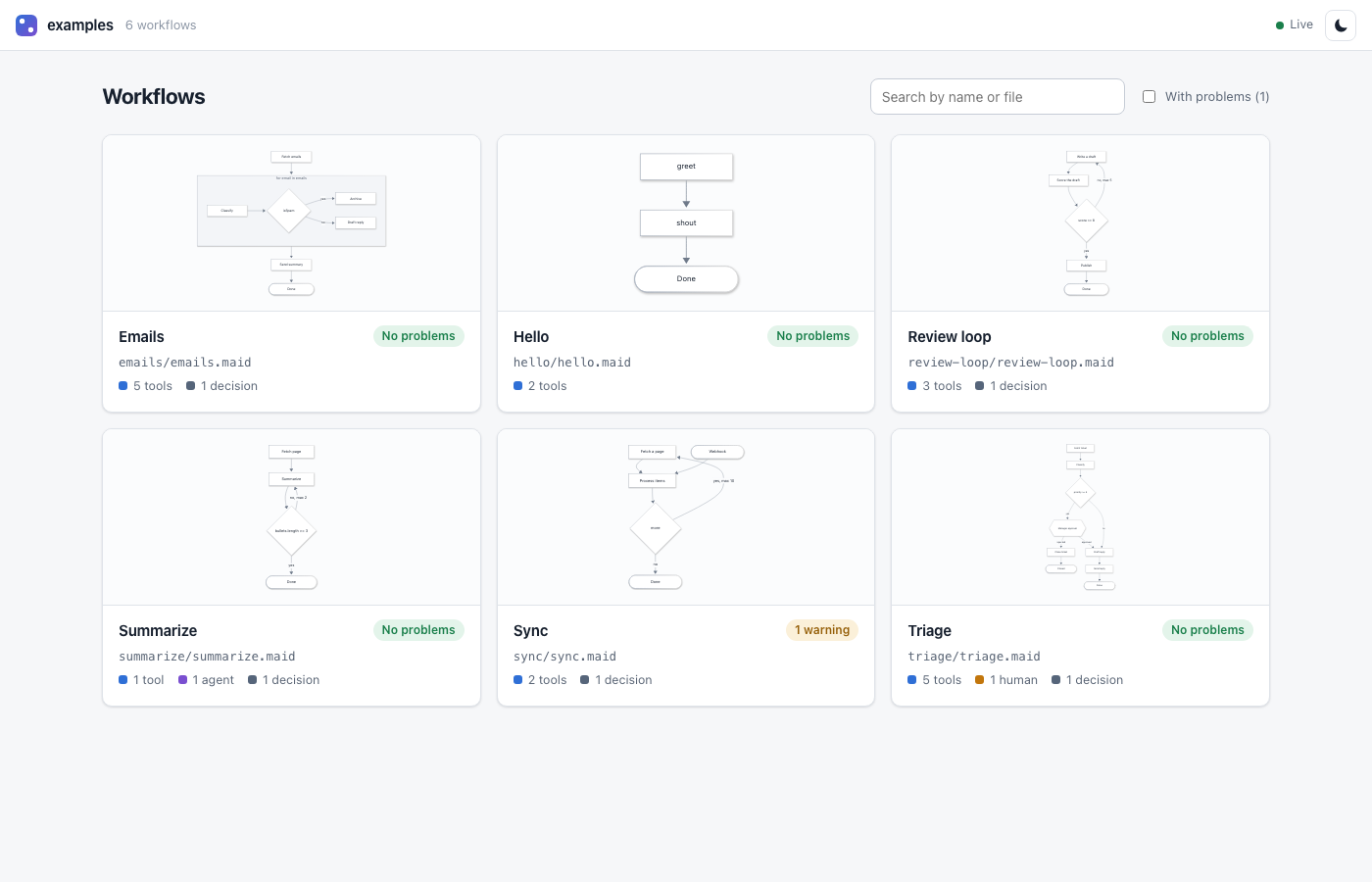
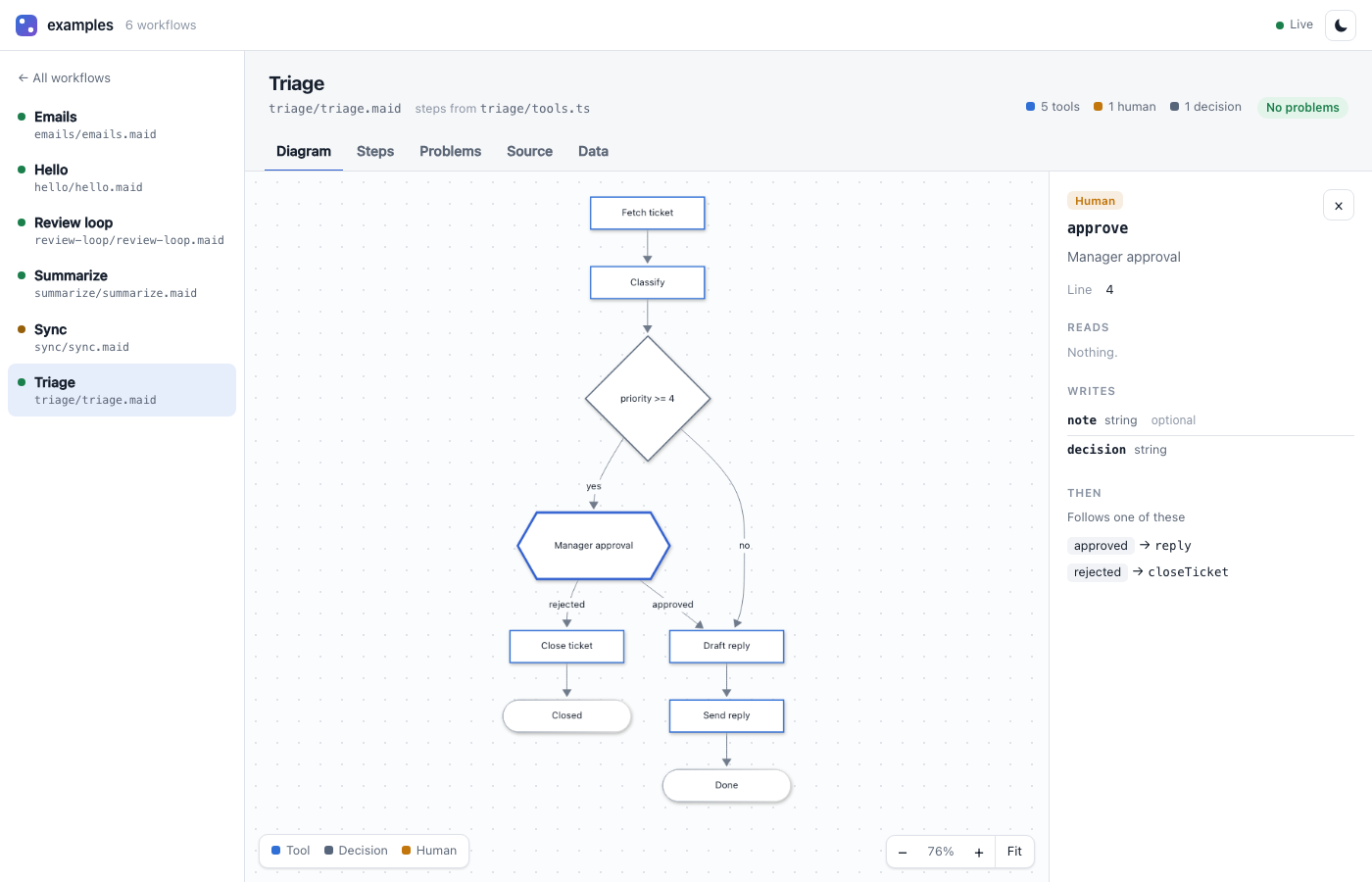
- Diagram: your Mermaid drawn by Mermaid itself, in its classic layout, with pan and zoom. Click a step to see what it reads, what it writes and where it goes next.
- Steps: every step in a table, with its kind and fields.
- Problems: the same checks as
check, with a link to the line. - Source and Data: the file with problem lines marked, and the raw data behind the page.
- Light and dark themes; works offline.
From code:
import { view } from '@typemaid/view';

const viewer = await view('./flows', { open: true });
console.log(viewer.url);
// later
await viewer.close();
What to know:
- This computer only, read-only. The page is served on
127.0.0.1, accepts only read requests, refuses other websites and unexpected host names, and loads nothing from the internet. - Step details come from your tools file, so that file’s code is loaded. Pass
--no-tools(ortools: false) to draw diagrams without loading any code. - No run history yet. The viewer shows what a workflow is, not what its runs did. That, and exporting a single HTML file, come next.
How the viewer is put together
The viewer lives in its own package, packages/view, published as @typemaid/view. It depends on the core; the core never depends on it. Both carry the same version and are released together. Without it, typemaid view prints how to install it.
The page is not tied to how the SDK works inside. It reads one small, versioned JSON format over HTTP, and that is all it knows.
Piece (in packages/view) |
Job |
|---|---|
src/contract.ts |
The JSON format. No imports. Has a schemaVersion. |
src/project.ts |
The one place that turns SDK results into that format. |
src/source.ts, source-fs.ts |
Where data comes from. Today: files on disk. |
src/handler.ts |
A standard (Request) => Response function serving /api/v1/... and the page. |
src/index.ts |
view(): starts a local server around the handler. |
ui/ |
The page itself, built ahead of time into dist/ui. |
A hosted version can reuse the same page by serving the same /api/v1 format from somewhere else. Tests enforce the boundaries: the viewer reaches the core only through typemaid and typemaid/node, the page may import only types from the contract, and the handler may import only the contract.
The page is built with only Mermaid’s flowchart support. The other diagram types, the maths renderer and the larger layout engines are left out, which keeps it under 1 MB. The build fails if the page grows past 1.5 MB.
Guarantees and limits (v0)
- Deterministic control flow. The diagram is compiled to plain JSON; no model decides which step runs next.
- At least once. If the process dies after a step ran but before its result was saved, that step runs again on resume. Use
ctx.keywith APIs that support idempotency keys. - A run finishes on the diagram it started with, even if the file changes while it is paused.
- For-each blocks are saved as a whole. A crash in the middle re-runs the whole block. Human steps are not allowed inside one yet.
- Values are JSON. Dates become strings;
undefinedis dropped. - Not built yet: schedules, generated types for
run(), nested subgraphs, error arrows,timeoutarrows, run history in the viewer.
Development
Bun is used for installing packages, running code and testing.
bun installbun run testbun run test:livebun run smokebun run view examples: opens the viewer on the examples, straight from source.bun run test: builds, then runs unit, golden, property and crash tests with Bun’s test runner; compares every accepted diagram with the official Mermaid parser. SetUPDATE_GOLDEN=1to rewrite the stored expected files.bun run test:live: one real model call. Needs.env.live(see.env.example). It is not named.envbecause Bun loads.envautomatically, which would make every test run call the model.bun run runtimes: runs one program against the built package on Bun, each installed Node version, and a sandbox with no Node APIs.bun run smoke: packs every package, installs the core alone in an empty project and runs it there (and on Node, if installed), then adds the viewer and the two stores and checks those too.bun run lint:pkg: publint and Are The Types Wrong.- Examples run directly:
bun examples/hello/index.ts.
Renaming
The product name, CLI name and accepted file extensions live in src/brand.ts (plus package.json). Stored runs and error codes do not contain the name. A test fails if the name appears anywhere else in src/. The viewer package also names the core in its imports and its package.json.
Design notes and the reasoning behind these choices are in SDK-DESIGN-GUIDE.md.
Licence
LICENSE.md (FSL-1.1-MIT).
- You may use, copy and modify this software, including inside your own commercial products.
- You may not offer it, or something built from it, as a commercial product or service that competes with it.
- Each release becomes available under the MIT licence two years after it is published.
The viewer page bundles third-party libraries (Mermaid, Preact and their dependencies), which remain under their own licences. Their licence texts are written to packages/view/THIRD-PARTY-NOTICES.md by the build and ship with that package.